 Netics Clerk
Your inbox and documents, sorted without you.
Clerk watches a mailbox or shared folder, reads the invoices, purchase orders and contracts that arrive, extracts the key fields, checks them and files everything in the right place. Anything unusual goes to a person, who decides.
The problem
Documents arrive by email in every format. Someone has to open them, retype amounts and dates, file them and chase what's missing, and errors only surface at month end.
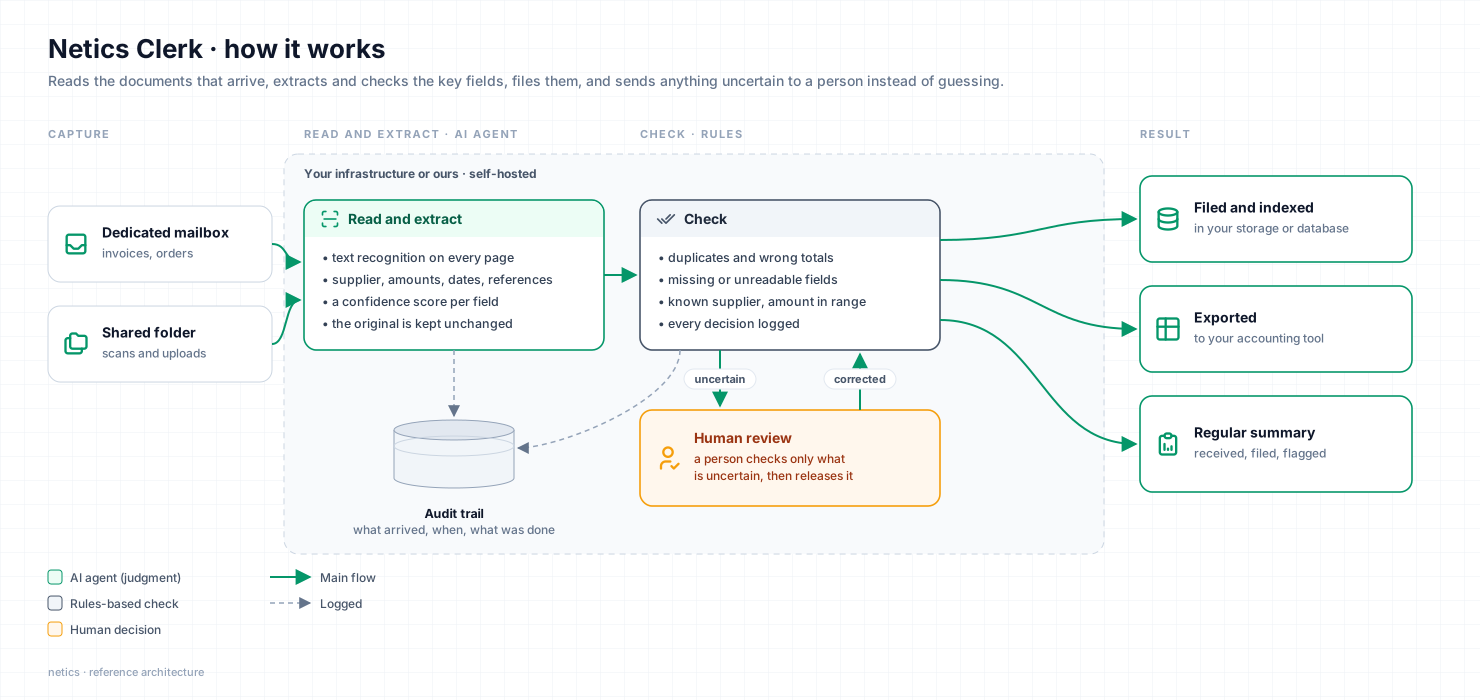
How it works
Capture
A dedicated mailbox or shared folder receives everything, as it does today.
Read and extract
Text recognition and AI extraction of supplier, amounts, dates and references.
Check
Rules catch duplicates, wrong totals and missing fields, and send them to a person.
File and report
Documents are stored and indexed in your tools, with a regular summary of what was processed.
What you get
- An automatic intake and filing workflow
- Extraction rules adapted to your documents
- A review queue for anything uncertain
- Exports to your storage, database or accounting tool
Built with
n8n, OCR, AI extraction, Directus, Nextcloud or your existing storage
A good fit if
- Invoices or documents arrive by email every day
- Someone retypes data from PDFs into another tool
- You need an audit trail of what was received and when
Uses building blocks we run every day: email routing, document processing with text-recognition checks, and n8n workflows connected to storage.
Talk it through with an engineer
Thirty minutes to look at your process and whether this fits. You leave with a clear next step, whatever you decide.